
Stripe payment notifications on your iPhone
Connect Stripe to Honk and you get a push on your iPhone for every failed payment, dispute and failed payout, and, if you want them, a Beep-beep for each sale. There’s no code to write: Stripe sends its events to one URL, and Honk checks Stripe’s signature, gives each event a level on the Honk scale and folds repeats together.
Payment problems land in the same inbox as your shop, your site and your servers. A customer whose card fails five times in a row is one group with a count, not five separate alerts.
Before you start
- A Honk account. Honk is invite-only for now: request access.
- A project for payments, for example “Shop”, in a workspace where you’re an owner or admin.
- A Stripe account where you can add webhooks.
1. Create the connection in Honk
In the Honk web app, open the project, go to Connections and click Connect a service. Choose Stripe, keep the name or change it, and click Connect.
Honk shows the connection’s Webhook URL, which starts with https://honk-honk.app/v1/hooks/stripe/. Copy it, and keep the page open: you’ll paste Stripe’s signing secret here in step 3.
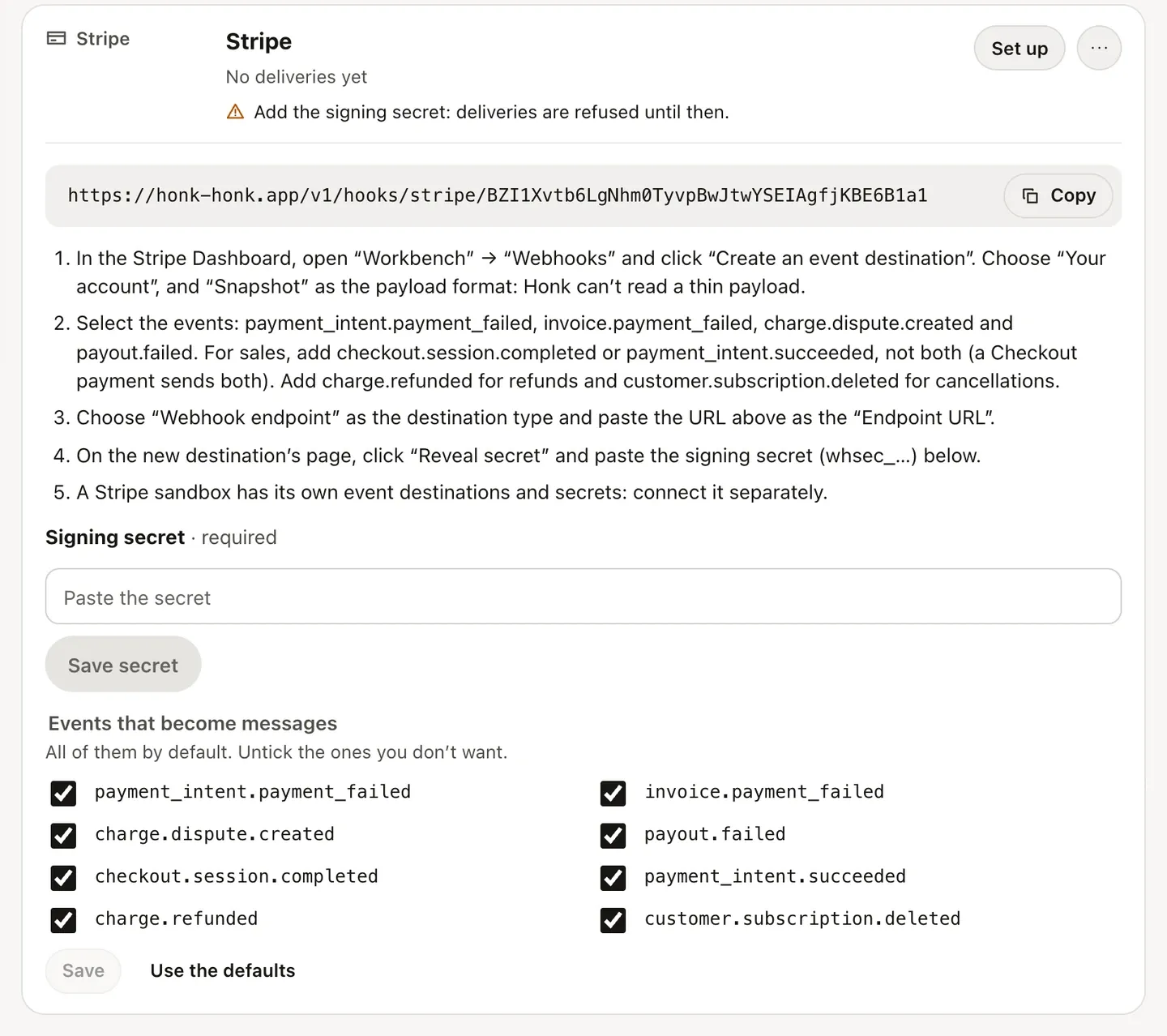
2. Add an event destination in Stripe
In the Stripe Dashboard, open Workbench ▸ Webhooks and click Create an event destination. Then:
- Choose Your account, and Snapshot as the payload format. Honk reads snapshot events, the format that carries the payment itself. Stripe suggests Thin, but a thin event carries only an ID, so Honk turns it away and the connection shows an error.
- Select the events:
payment_intent.payment_failed,invoice.payment_failed,charge.dispute.createdandpayout.failed. For sales, addcheckout.session.completedorpayment_intent.succeeded, for refundscharge.refunded, and for cancellationscustomer.subscription.deleted. - Choose Webhook endpoint as the destination type, and paste the URL from Honk as the Endpoint URL.
Pick one of the two sale events, not both. A payment through Stripe Checkout sends both of them, so with both selected you’d hear about every sale twice.
3. Paste the signing secret into Honk
On the new destination’s page, Stripe shows a signing secret that starts with whsec_. Click Reveal secret and copy it. In Honk, paste it into Signing secret and click Save secret.
Honk refuses Stripe’s deliveries until the secret is saved. After that, it checks the signature of every delivery, and one that doesn’t match, or that was signed more than 5 minutes earlier, never becomes a message.
4. Try it in a sandbox
A Stripe sandbox has its own event destinations and signing secrets, so it needs its own connection in Honk. Create a second connection the same way, add the destination in the sandbox, and send a test event with the Stripe CLI:
# with the Stripe CLI, signed in to the sandbox
stripe trigger payment_intent.payment_failed
A Loud honk arrives within seconds. Sandbox events carry the environment test, so they never fold into live ones. On the Free plan, the sandbox connection is your second and last one: delete it once you’ve seen it work. In live mode, the connection shows the time of Stripe’s last delivery, or the last error, such as a signature that didn’t match.
What each event becomes
- A failed payment (
payment_intent.payment_failed) or a failed invoice payment (invoice.payment_failed): a Loud honk, titled “Payment failed: 49.00 EUR”, with Stripe’s reason and the customer. Each customer gets their own group, so repeated failures for one customer fold together. - A new dispute (
charge.dispute.created): a Long honk, with the amount and the reason. - A failed payout (
payout.failed): a Long honk, with Stripe’s explanation. - A sale (
checkout.session.completedorpayment_intent.succeeded): a Beep-beep, “New sale: 49.00 EUR” or “Payment received: 49.00 EUR”. All sales share one group. - A refund (
charge.refunded): a Light honk, “Payment refunded: 49.00 EUR”, or “Partial refund: 20.00 EUR” with how much of the payment that is. Each customer’s refunds fold into one group. - A canceled subscription (
customer.subscription.deleted): a Light honk.
Other event types are accepted and dropped. Amounts are shown in the currency’s main unit, and most messages link to the payment, dispute, payout or subscription in the Stripe Dashboard.
The first event of a group pushes right away. More of the same arrive as an update with the running count, at most one every 5 minutes. After 24 hours without events (the default), a group starts over, and the next event pushes again. Stripe never reports that a failed payment was fixed, so these are events, not incidents: there’s no recovery to wait for. When several customers’ payments fail within a few minutes, each one is still pushed, but only the first makes a sound.
Choose what you hear about
Every event type above is on by default. Under Events that become messages on the connection, untick the ones you don’t want, for example the sales, and click Save.
To keep sales out of your pushes but still see them, add a rule under the project’s Rules: when Channel equals payment_intent.succeeded (or checkout.session.completed), set Notifications to Digest only. Sales then arrive in one digest every 15 minutes by default, while disputes and failed payouts still push right away.
Plans and limits
Each connection counts toward your workspace’s plan: Free includes 2, Pro 20 and Team 100. Messages from Stripe count toward the plan’s daily message and push limits like any others; pricing lists them.
Pushes arrive in Honk for iPhone and on your Apple Watch. If you sell through Shopify or WooCommerce too, the Shopify guide and the WooCommerce guide put orders in the same inbox, and the integrations page lists every other way to send to Honk.
Honk is invite-only for now: request access. Everything in this guide works on the Free plan.